COMPUTING POWER
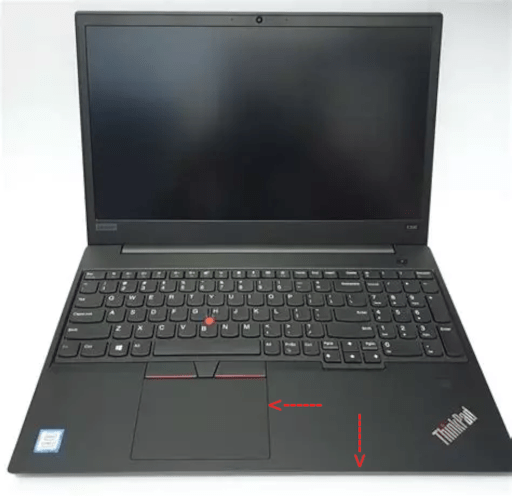
The Lenovo Thinkpad E590 15.6″ HD Business Laptop comes with an (Intel Quad Core i5-8265U, 8GB DDR4 Memory, 256GB PCIe 3.0(x4) NVMe SSD M.2 SSD) Type-C, HDMI, Ethernet, Webcam, and Windows 10 Pro. As a Unix Systems Administrator by education and trade, this notebook computer is quite impressive from a technological perspective. It has a drive bay for both IDE SATA and M.2 SSd/NVMe that can be installed simultaneously allowing for true dual BOOT functionality.
FLIMSY AND POOR DESIGN
That is about the positive remarks I have about this product. When it was purchased, it was advertised as having an NVMe drive, and upon arrival it contained an IDE SSD. The next identified short coming was the encasement quality. The encasement is cheaply made from flexible plastic. That means very limited protection for the internal components, the main board being most critical and susceptible to damage. Another major down side of this computer is the lack of a back lit keyboard. The entire encasement is black with a black keyboard with slightly grey letters and symbols. The numeric key pad malfunctioned shortly upon arrival and has no functionality under any operating system including Fedora, CentOS, Debian, Ubuntu or MS Windows.
Aside from the encasement twisting and flexing, the TouchPad is hyper sensitive. It simply takes up far too much real estate in the Palm Rest area. If the hand slightly touches the TouchPad, the focus jumps to whatever location the pointer is. Suddenly one finds themselves typing or over typing an area other than what is intended. This really breaks the thought pattern when deep in concentration. Another issue with the notebook computer is the forward edge where the seam exists from the bottom cover. There is a very small space where the hair on one’s arms gets lodge when moving between the keyboard and touch pad. The hair is painfully pulled from the forearms when moving back into typing position. We have two of these Lenovo E590 notebook computers and all those who use it for editing prefer to use any other computer other than the Lenovo E590 ThinkPad.
We have several Dell computers with failed keyboards and prefer to connect an external keyboard in already cramped desk space and quarters to the Dell notebooks just to avoid the annoyances of an ultra wide TouchPad foot print. As we know, real estate is expensive, and even more critical when it comes to notebook computers.
We will not allow the Lenovo E590 ThinkPad to travel with us, ever. It is really that poorly designed and is best protected by leaving it in the office, which it doesn’t seem to mind. Also, we cannot recommend this computer to anybody. We suggest either a Dell or for the rugged travelers the Panasonic Toughbook. We cannot suggest any Apple products due to our support of FOSS and eliminating closed source software and hardware.